
Copilot licensing explained: what you get, what you pay for, and what you actually need
Why is this so confusing?
Microsoft has moved quickly with Copilot, and the names haven't always kept up. The same word, "Chat", now describes both a free product and a mode inside the paid app. New features such as Cowork, Code and Autopilot have arrived with a different way of charging. And the app on your laptop looks the same whichever licence you have.
The good news is that it comes down to three simple questions. What does everyone get for free? What does the paid licence add? And what is charged on top, based on how much you use it? Let's take them one at a time.
1. What everyone gets: Copilot Chat
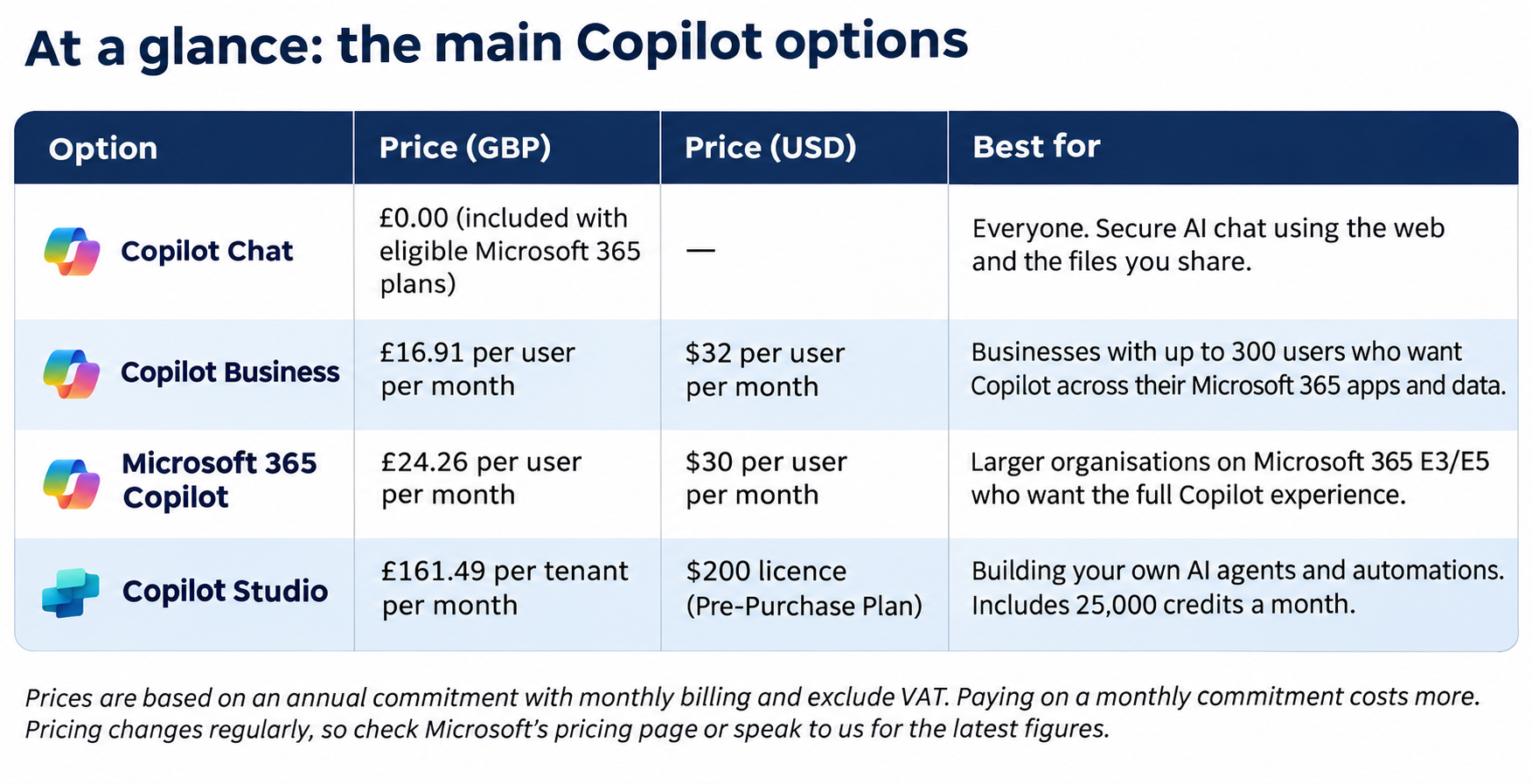
If your business already has an eligible Microsoft 365 subscription, your people already have Copilot Chat. There's no extra cost and no separate licence to assign.
Copilot Chat is a secure, work-ready AI assistant. You can ask questions, draft content, summarise documents and analyse files you upload, all with enterprise data protection, so your prompts and data stay within your Microsoft 365 environment.
The key limitation is context. Copilot Chat works with what you give it: the web, plus the files you attach or have open. It doesn't automatically search across your emails, meetings, Teams chats and SharePoint files. Outlook is the main exception, where it can help with your mailbox and calendar.
2. What the paid licence adds: Microsoft 365 Copilot
The paid licence is where Copilot starts to understand your work, not just the question in front of it. That's thanks to Work IQ, the intelligence layer that lets Copilot draw on your emails, meetings, chats, files and calendar, and Mercury using only the information you already have permission to see.
With a paid licence you also get:
• Copilot built into Word, Excel, PowerPoint, Outlook and Teams, including meeting recaps
• The Researcher and Analyst agents for deeper research and data analysis
• A choice of AI models, or leave it on Auto and let Copilot decide
• Priority access when the service is busy
For a consultant, that's the difference between asking "How do I write a candidate summary?" and asking "Summarise everything I've discussed with this client over the last month."
3. What's charged on top: usage-based billing
This is the newest part of the story, and the bit that catches people out.
Some of Copilot's most powerful features aren't included in the per-user price. Instead, they're billed based on how much you use them, through Copilot Credits. That includes:
• Cowork, which takes on whole multi-step tasks for you, such as preparing a client briefing from your emails, calendar and CRM
• Code, which lets you build trackers, dashboards and simple apps by describing them in plain English
• Autopilot, an always-on personal agent that keeps working when you're not (currently in early preview)
• Agents that use company data, when used by people with the free Copilot Chat
Cowork, Code and Autopilot need a Microsoft 365 Copilot licence first. Your IT team then has to set up a spending policy before anyone can use them. If you click on Cowork and see a message asking you to request access, that's why.
The upside is control. Admins can set budgets and limits, decide who can request access, and see where the credits are going. You only pay for the work that gets done.
How do I know which one I have?
Open the Copilot app or Word and look at the label under your name. Basic means you're using the free Copilot Chat. Premium (or Pro) means you have the paid Microsoft 365 Copilot licence.
So what should a recruitment business actually buy?
You don't need to give everyone everything. A sensible approach looks like this:
• You probably have Copilot Chat for everyone. It's already included, so get people using it and building good habits.
• License the people who live in their inbox, diary and client conversations, such as consultants, business development and leadership. They get the most from Work IQ.
• Pilot Cowork with a small group and a clear budget before rolling it out more widely. Speak to Mercury about building agents and AI tools unique to your business.
• Tidy up your SharePoint and file permissions first. Copilot only shows people what they can already access, so make sure that's what you intended.
Most importantly, measure the value. Pick a few everyday tasks, such as shortlisting, client updates or job ads, and track the time saved and productivity gained. That makes the case for the next round of licences much easier. Then look at aspects of the workflow which can be replaced by an agent, freeing up your people to do better work.
Need a hand?
At Mercury, we help recruitment businesses get real value from Microsoft Copilot, from choosing the right licences to building agents that work with your CRM and ATS. If you'd like to talk it through, get in touch with the team.